Clips, under Movie Studio in the sidebar, makes one video clip at a time, with sound, from a shot you describe. Clips are the building blocks of your film: make one per storyboard frame, then cut them together in the Film Editor.
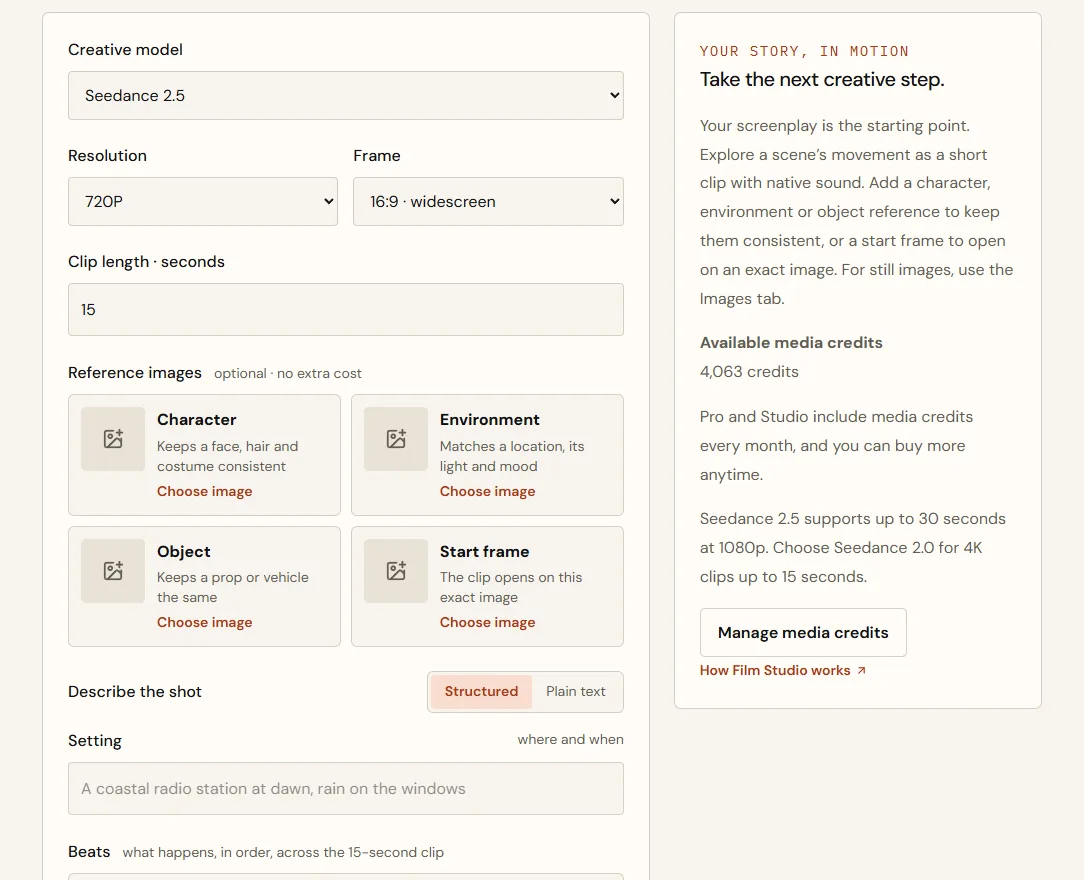
Choose the model and length
| Model | Resolution | Clip length |
|---|---|---|
| Seedance 2.5 | 720p or 1080p | 4 to 30 seconds |
| Seedance 2.0 | 720p, 1080p or 4K | 4 to 15 seconds |
Describe the shot in beats
The structured editor splits the shot into a Setting, timed Beats, a Style and Sound. Beats are what happens, in order; each can have a camera move.
- Set the sceneOne line in Setting: where and when.
- Write the beatsThree beats suit a 15-second clip. Use Add beat for more (up to six) and Spread times evenly to share out the time.
- Add a camera move to each beatOptional, but it makes a big difference.
- Describe the look and the soundSound is generated with the clip: ambience, effects, dialogue or music.
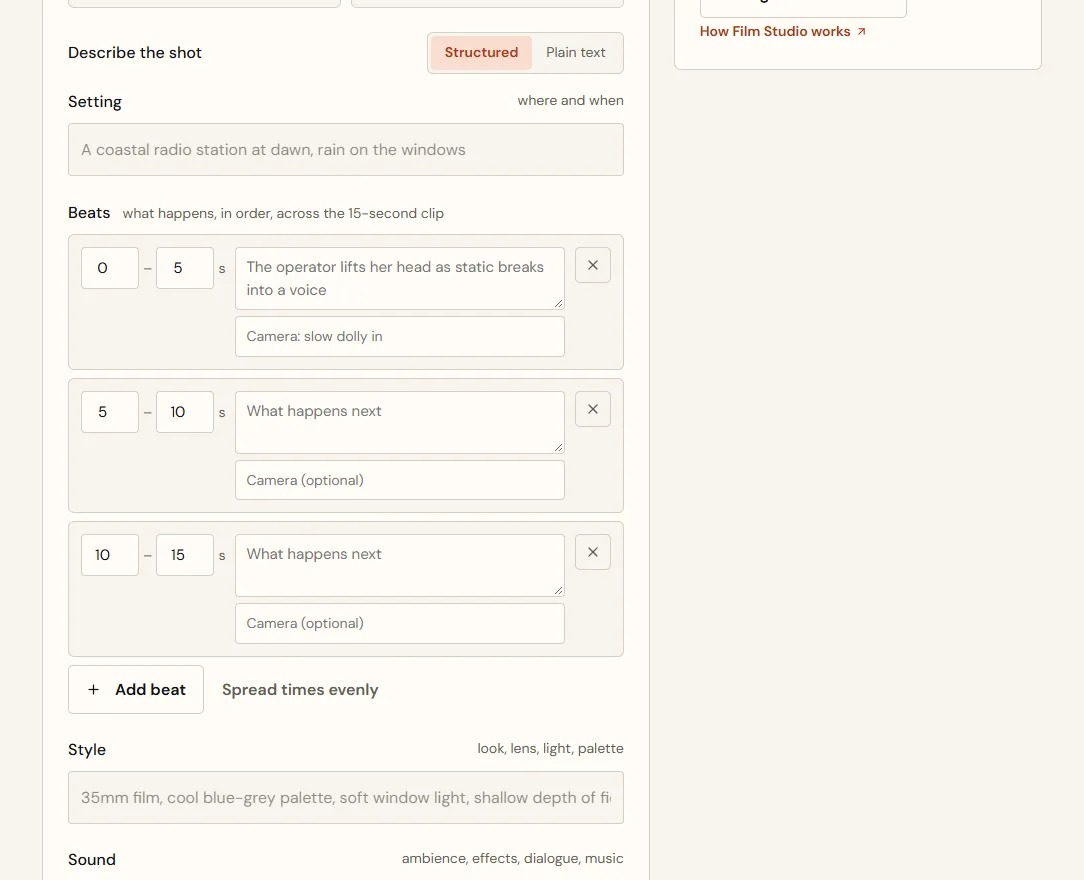
- Setting
- A coastal radio station at night, rain on the windows
- 0–5 s
- Mara lifts her head as static breaks into a voice · Camera: slow dolly in
- 5–10 s
- She turns up the gain; the voice says the name of a boat · Camera: close-up on her hands
- 10–15 s
- She turns toward the window as the lighthouse beam crosses her face · Camera: hold
- Style
- 35mm film, cool blue-grey palette, amber console light
- Sound
- Rain, radio static, a faint distorted voice calling for help
Setting: A coastal radio station at night, rain on the windows.
0-5s: Mara lifts her head as static breaks into a voice. Camera: slow dolly in.
5-10s: She turns up the gain; the voice says the name of a boat. Camera: close-up on her hands.
10-15s: She turns toward the window as the lighthouse beam crosses her face. Camera: hold.
Style: 35mm film, cool blue-grey palette, amber console light.
Sound: Rain, radio static, a faint distorted voice calling for help.
This is exactly what's sent. Switch to Plain text to edit it directly, and back to Structured to see it as beats again.
| Camera move | What you'll see |
|---|---|
| slow dolly in / push in | The camera moves closer; tension builds |
| dolly out / pull back | Reveals the space around the subject |
| pan left / pan right | The camera turns to follow or reveal |
| tilt up / tilt down | Looks up to or down from the subject |
| handheld | A slight shake that feels urgent and close |
| crane up | Rises above the scene |
| hold / static | No movement; lets the action play |
Start frames and references
A Start frame is an image the clip opens on exactly, then continues from. It's the best way to make a clip match your storyboard. Character, Environment and Object references keep people, places and props consistent, just as they do for images. References are free.
- Start frame
- Your image of Mara at the console
- Beats
- The three beats above
- Result
- The clip's first frame is your image; then Mara lifts her head and the shot plays out
Price and timing
- Choose Review credit priceThe exact price is shown and held for five minutes.
- Choose Create clipThe credits are reserved, not spent.
- Wait 3 to 8 minutesYou can leave the page; the result page shows the time so far.
- The clip is savedOnly now are the credits spent. If it fails, they're returned.
| Model and settings | Length | Price |
|---|---|---|
| Seedance 2.5, 720p | 5 seconds | 334 credits ($3.34) |
| Seedance 2.5, 720p | 15 seconds | 964 credits ($9.64) |
Example prices at the time of writing. Higher resolutions cost more; the price on screen is the price you pay.
Tips for better clips
- One shot per clip. Cut between shots in the Film Editor rather than inside one clip.
- Three beats for 15 seconds is plenty. Crowded beats make rushed action.
- Name the camera move in every beat.
- Describe the sound. Silence is a choice; say so if you want it.
- Keep to three characters or fewer in a shot.
- Use a start frame when the clip has to match a storyboard frame.
- You can start two generations (images or clips) at a time. At most two of yours are made at once; any more wait their turn, with their credits held.
Quick answers
How long does a clip take?
Usually 3 to 8 minutes. You can leave the page and come back.
A clip failed. Was I charged?
No. Reserved credits are returned when a clip can't be completed.
Will my 1080p clip play in every browser?
Yes, in Chrome, Edge and Firefox. Each clip also gets a copy made for playing, a minute or two after it finishes (an older clip, the first time you open it). Until the copy is ready the clip plays as it was made, which some browsers can't do at 1080p. Download always gives you the original.