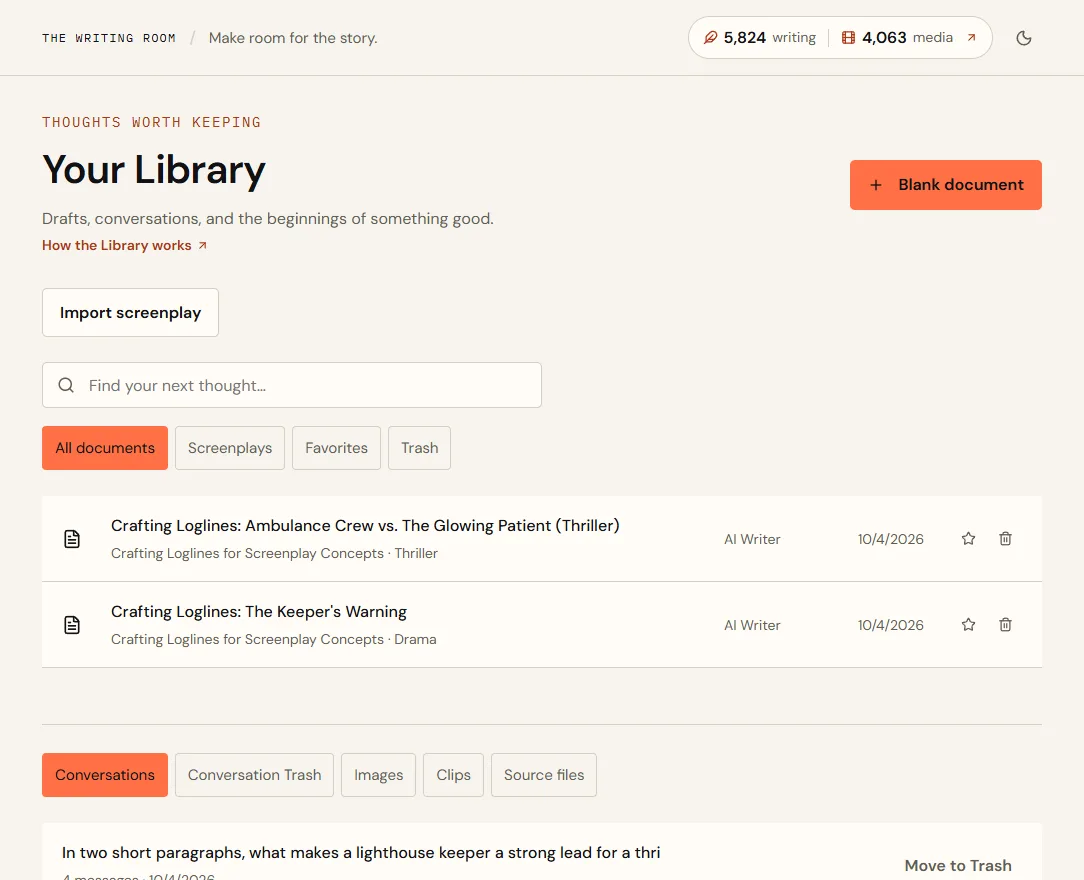
What's where
| Tab | What it holds |
|---|---|
| All documents | Every document, newest first: AI Writer results, saved chat replies, alternate drafts, imports and documents you started yourself. The label beside each says which, and AI Writer results name the tool |
| Screenplays | Screenplays from the screenplay editor |
| Favorites | Documents you've starred |
| Trash | Deleted documents and screenplays, restorable for 30 days |
| Conversations | Your chats with writing partners |
| Conversation Trash | Deleted conversations, restorable for 30 days |
| Images | Every image you've created or uploaded |
| Clips | Every clip you've made |
| Source files | Screenplays and other files you've uploaded |
Use the search box to find a document by title, and the star beside a document to add it to Favorites.
Import a screenplay
- Choose Import screenplay and pick a file.
- Wait for the checkYou'll see Extracting text and checking the file… for a few seconds.
- Check the previewIt shows how many characters were extracted and the opening lines.
- Choose Open as a documentThe text becomes a new document you can edit and discuss with a partner.
| File | Can I import it? |
|---|---|
| .txt and .md | Yes |
| .fountain | Yes, as plain text |
| .docx | Yes |
| PDF with selectable text | Yes, up to 250 pages |
| Scanned PDF (photos of pages) | No. Paste the text into a blank document instead. |
- File
- night-station-draft3.pdf, 104 pages
- Preview
- 98,412 characters extracted
- Result
- A document with one section called Imported screenplay
- Original
- Kept in Source files, ready to download
Delete and restore
- Select the bin icon beside a document.
- Changed your mind?Open the Trash tab and choose Restore within 30 days. Each item in Trash shows the date it will be deleted for good.
To delete an image or clip, open it and choose the bin icon (it says Delete when you point at it). A small window says what goes; choose Delete permanently, or Keep it to change your mind. It's removed at once, everywhere it appears, including storyboards and films; there's no Trash for media. In Library → Images, Source files and the Movie Studio gallery, the bin icon does the same, and also asks you to confirm.
Start from scratch
Choose Blank document for an empty document with one section, The story begins.
Quick answers
My PDF won't import.
It's probably scanned (pictures of pages), so there's no text to extract. Copy the text from your screenwriting app and paste it into a blank document.
How long does Trash keep things?
30 days. After that, items are permanently deleted.