Screenplays is where you write the script itself. Each line is a screenplay element (scene heading, action, character, parenthetical, dialogue or transition), formatted on the page as you type. Every change saves on its own, and earlier versions are kept.
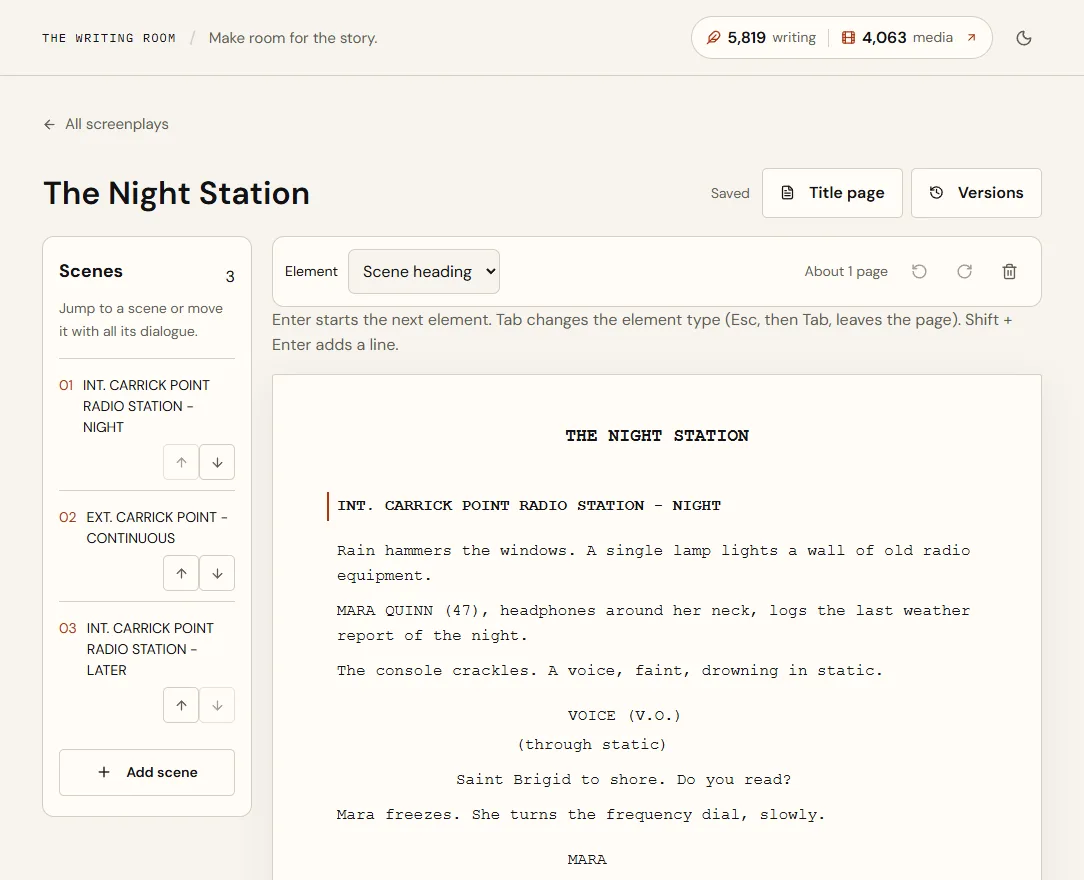
Start a screenplay
- Open Screenplays in the sidebar.
- Choose New screenplayYou start on a scene heading, INT. LOCATION - DAY, with an empty action line below it.
- Name itSelect the title at the top of the page and type. The title also goes on the title page.
Already have a script? Choose Import Fountain or FDX and pick a Fountain (.fountain) or Final Draft (.fdx) file up to 5 MB. Anything the editor doesn't keep, such as notes or dual dialogue, is listed when the import finishes, never dropped silently.
Write with the keyboard
| Key | What it does |
|---|---|
| Enter | Starts the next element: after a scene heading comes action, after a character comes dialogue, after dialogue comes action. |
| Tab | Changes the current element's type: action → character → transition → scene heading, and dialogue ↔ parenthetical. Shift + Tab goes back. |
| Shift + Enter | A new line inside the same element. |
| Backspace on an empty element | Removes it and returns to the line above. |
| Ctrl + 1 to 6 (⌘ on Mac) | Scene heading, Action, Character, Parenthetical, Dialogue, Transition. |
| Ctrl + Z / Ctrl + Shift + Z | Undo and redo. |
| Esc, then Tab | Leaves the page for the next control, for keyboard navigation. |
Scene headings, character names and transitions show in capitals. Type a parenthetical without its brackets; they're added for you. When you type a character name, names you've already used are suggested.
- Scene heading
- INT. RADIO STATION - NIGHT, then Enter
- Action
- Static hisses from the console. Enter, then Tab
- Character
- MARA, then Enter
- Dialogue
- Is anyone out there? Enter, Tab, Tab
- Transition
- CUT TO:
Scenes
The Scenes list beside the page shows every scene heading in order. Select a scene to jump to it, and use the arrows to move a scene, with all its action and dialogue, up or down. Add scene adds a new scene at the end. With more than six scenes, a search box helps you find one by its heading.
The page count at the top is an estimate at the standard 54 lines a page; the PDF is the exact count.
Saving, versions and restoring
Changes save about a second after you stop typing; the status beside the title shows Saved, Saving… or Unsaved changes. If your browser closes before a save, reopen the screenplay in the same browser and your unsaved changes come back.
- A version is kept automatically every 15 minutes while you write.
- Choose Versions → Save version to keep the current draft with a note, such as Table read draft.
- Restore makes an earlier version the current draft. The draft it replaces is kept as a version first, so nothing is lost.
- PDF beside a version downloads that version as it was.
- The newest 50 versions are kept.
Title page
Choose Title page to fill in Written by, Based on, Draft date and Contact. They appear on the PDF title page and in Fountain files.
Download and share
| Format | Best for |
|---|---|
| Reading, printing and submitting. Courier 12 on US Letter with standard margins, a title page, page numbers, and dialogue that carries across pages with (MORE) and (CONT'D). | |
| Fountain | Plain-text screenplay format that most screenwriting apps open. |
| Final Draft (FDX) | Opening in Final Draft. Elements carry across; Final Draft's own formatting settings apply. |
Trash
Choose the bin icon on a screenplay to move it to Trash. Open the Trash tab to restore it within 30 days; after that it's deleted for good, with its versions.
Limits
- Up to 200 screenplays, including those in Trash.
- Up to 5,000 elements and 300,000 characters per screenplay. A 120-page feature has about 2,800 elements.
- Imports up to 5 MB.
Quick answers
Does writing a screenplay use credits?
No. Writing, saving, versions and downloads are free. Only AI tools use credits.
Can I move my script to and from Final Draft?
Yes. Import an .fdx file from Screenplays, and download Final Draft (FDX) from any screenplay. Final Draft's title page and revision marks aren't imported; anything left out is listed when you import.
How is a screenplay different from a document?
Documents hold what the AI Writer tools make: loglines, outlines, character work. Screenplays hold the script itself, in screenplay format. Keep both and move between them as you write.